PyAutomation User Guide
📚 Your Complete Guide to PyAutomation
Master Industrial Automation with Comprehensive Documentation
Welcome to the PyAutomation User Guide - your comprehensive resource for mastering industrial automation and control with PyAutomation. This guide empowers operators and engineers to maximize PyAutomation's potential through detailed instructions, visual aids, and best practices.
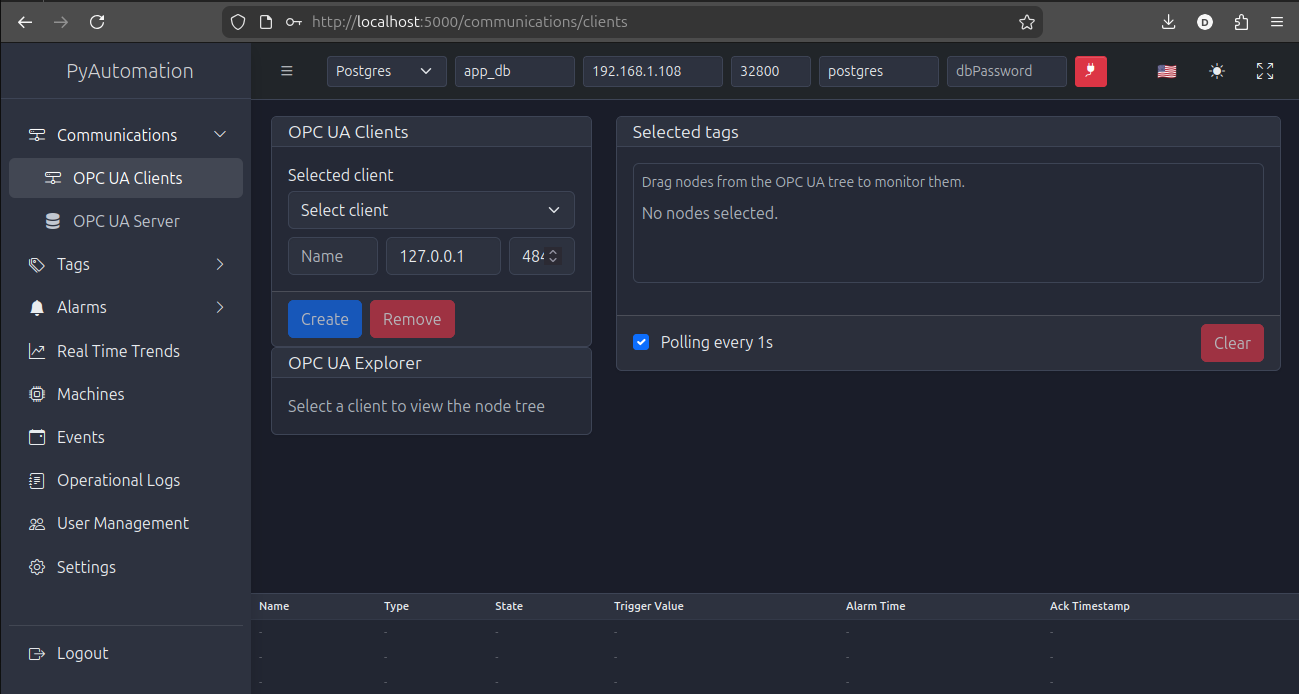
Figure 1: PyAutomation 2.0.0 Modern React Interface - Your gateway to industrial automation excellence
✨ What's New in Version 2.0.0
🚀 Revolutionary Modern Web Interface
PyAutomation 2.0.0 introduces a revolutionary modern web interface built with React, delivering an exceptional user experience that combines powerful industrial automation capabilities with intuitive, responsive design.
⚡ Modern React Interface
Fast, responsive, and intuitive user experience
🔄 Real-Time Updates
Live data visualization without page refreshes
📊 Enhanced Visualization
Advanced strip charts and trend analysis
🧭 Improved Navigation
Streamlined sidebar and intuitive module organization
⚡ Better Performance
Optimized rendering and efficient data handling
📱 Mobile-Friendly
Responsive design that adapts to different screen sizes
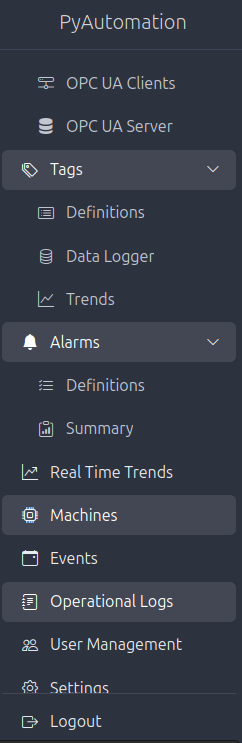
Figure 2: Modern sidebar navigation with all modules accessible - Intuitive and efficient
🎯 Objective
This comprehensive manual empowers operators and engineers to maximize PyAutomation's potential. By following these guides, you'll set up a reliable, efficient, and secure automation environment. Each section includes detailed instructions, visual aids, and best practices to facilitate your learning journey.
🧩 Core Modules Overview
Discover PyAutomation's Powerful Modules
PyAutomation is a modular platform designed to streamline industrial system management
🏷️ Tags Module
The Central Nervous System of Your Automation Project
The Tags Module manages all data points that represent real-world process variables, sensors, actuators, and control parameters.
✅ Comprehensive Management
Create, edit, and delete tags with intuitive forms
🔍 Advanced Filtering
Gaussian and process filters for noise reduction
🚨 Anomaly Detection
Built-in frozen data, outlier, and out-of-range detection
🔌 OPC UA Integration
Seamless connection to external OPC UA servers
📁 Metadata Organization
Segment and manufacturer classification
📤 Export Capabilities
CSV export for backup and analysis
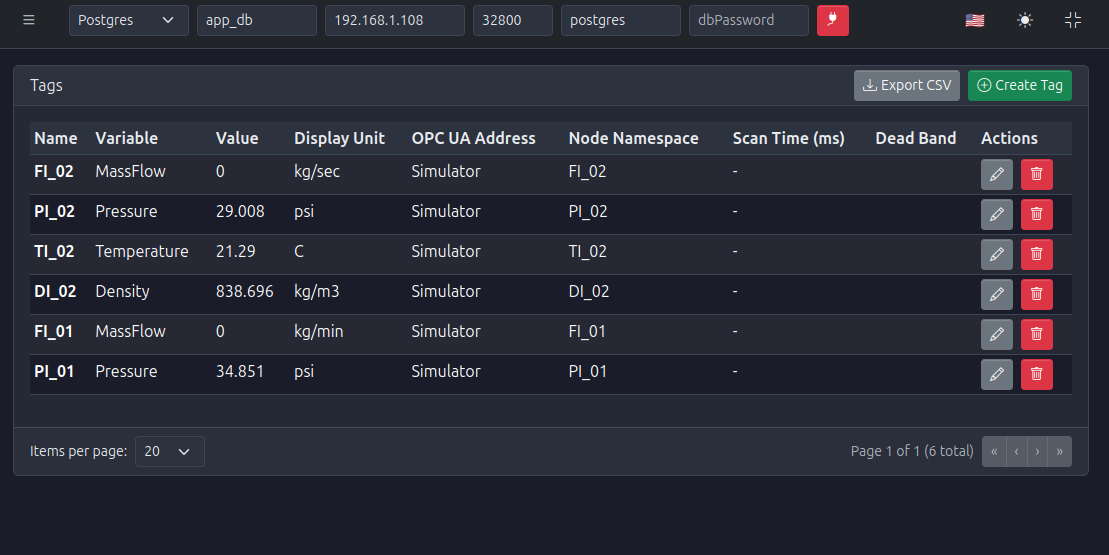
Figure 3: Tags module showing organized tag management with advanced features
🔌 Communications Module
Seamless Integration with Industrial Devices
The Communications Module handles external connectivity, enabling seamless integration with industrial devices and SCADA systems.
🔗 OPC UA Client
Connect to multiple OPC UA servers simultaneously
🔍 Node Browser
Visual exploration of OPC UA address spaces
⚡ Multi-Selection
Efficient tag selection with Ctrl+Click support
⏱️ Polling Configuration
Flexible scan time configuration per connection
📊 Connection Status
Real-time monitoring of communication health
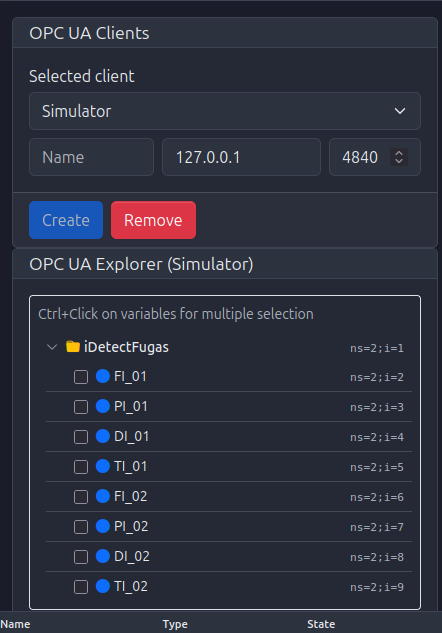
Figure 4: OPC UA node browser for exploring server address spaces - Visual and intuitive
💾 Database Module
Reliable Data Persistence for Historical Analysis
The Database Module ensures reliable data persistence for historical analysis, auditing, and compliance.
🗄️ Multi-Database Support
PostgreSQL, MySQL, and SQLite compatibility
⚙️ Automatic Schema
Tables created automatically on first connection
📈 Historical Logging
Comprehensive data retention for trends
🔧 Easy Configuration
Simple connection setup through intuitive forms
🛡️ Data Integrity
Robust transaction management and error handling

Figure 5: Database configuration interface - Simple and powerful
🚨 Alarms Module
Enterprise-Grade Alarm Management (ISA-18.2 Compliant)
The Alarms Module provides enterprise-grade alarm management following ISA-18.2 standards, ensuring operational safety and compliance.
🔔 Multiple Alarm Types
BOOL, HIGH, LOW, HIGH-HIGH, LOW-LOW triggers
📊 State Management
Complete lifecycle tracking (Normal, Unacknowledged, Acknowledged, Shelved)
⚙️ Alarm Actions
Acknowledge, shelve, unshelve, and return to service
📜 Alarm History
Comprehensive audit trail of all alarm state changes
📤 Export Functionality
CSV export for compliance reporting
⚡ Real-Time Monitoring
Live alarm status updates
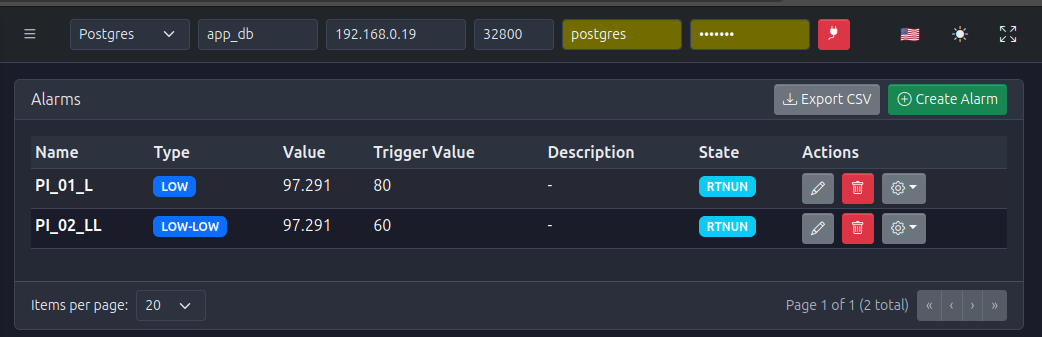
Figure 6: Alarms dashboard with real-time status monitoring - ISA-18.2 compliant
🌐 OPC UA Server Module
Expose Your Data to External Systems
The OPC UA Server Module exposes your automation data to external systems, enabling seamless integration with SCADA, HMIs, and other industrial applications.
🔧 Embedded Server
Built-in OPC UA server running as a state machine
📁 Organized Structure
Three main folders: CVT, Alarms, Engines
🔒 Access Control
Configurable read/write permissions per variable
⚡ Real-Time Updates
Continuous data publishing
🌍 Standard Protocol
Industry-standard OPC UA for maximum compatibility
📈 Real-Time Trends Module
Powerful Visualization for Live Process Monitoring
The Real-Time Trends Module provides powerful visualization capabilities through configurable strip charts for live process monitoring.
📊 Multiple Charts
Create unlimited custom dashboards
✏️ Edit & Production Modes
Switch between configuration and locked viewing
🖱️ Drag & Resize
Flexible layout customization
🏷️ Multiple Tags
Display related variables together
📏 Dual Y-Axes
Support for different units on the same chart
💾 Persistent Layouts
Automatic saving of dashboard configurations
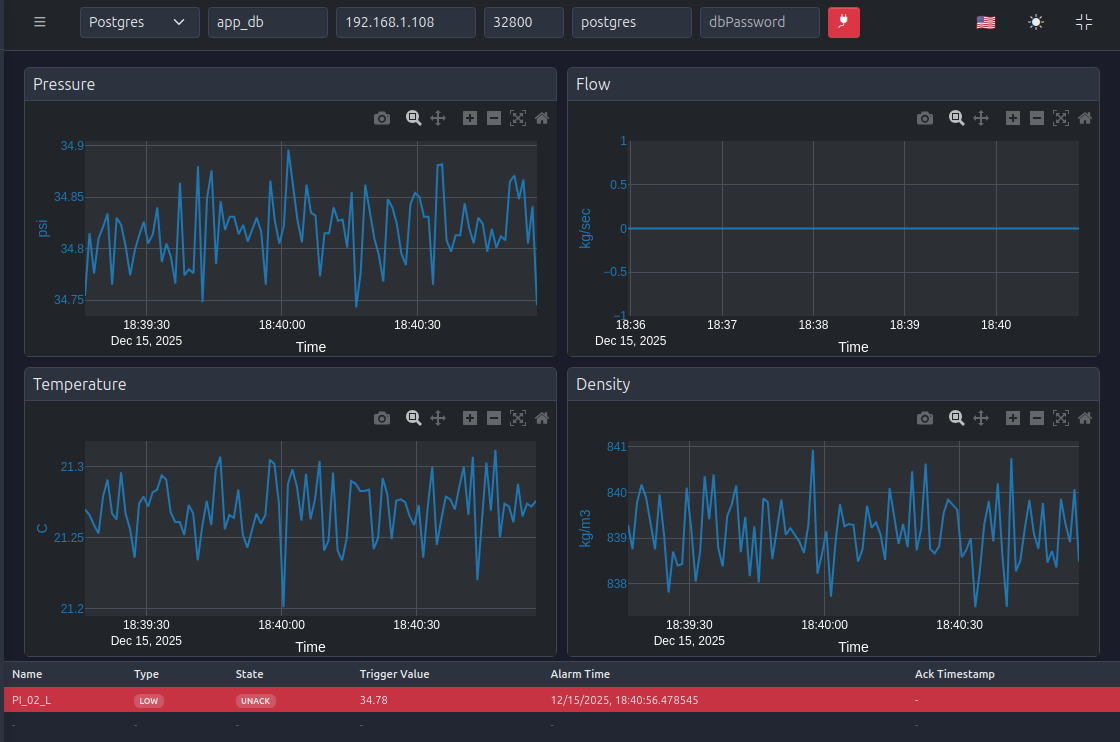
Figure 7: Real-time strip charts displaying live process data - Powerful and flexible
🤖 Machines Module
Monitor and Manage State Machines
The Machines Module provides comprehensive monitoring and management of state machines (engines) that execute control logic and data processing.
👁️ State Monitoring
Real-time view of all state machine states
⏱️ Interval Configuration
Adjust execution intervals for performance tuning
🔄 State Transitions
Manual control of machine lifecycles
📊 Lifecycle Tracking
Complete state history (Starting, Waiting, Running, Resetting)
⚡ Performance Optimization
Fine-tune system performance through interval management
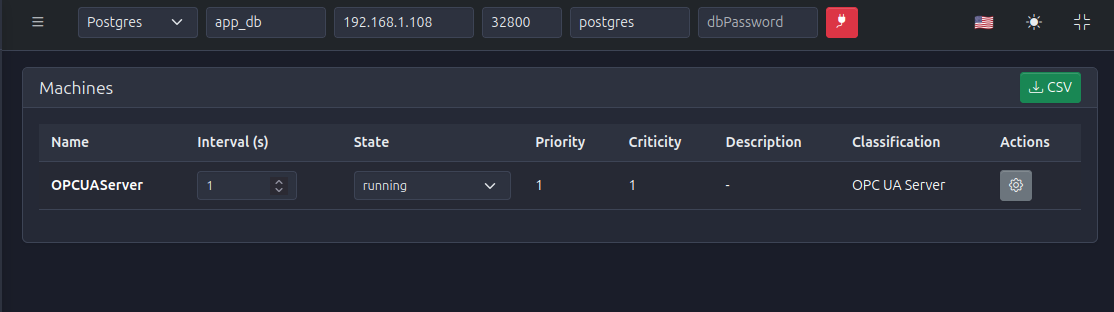
Figure 8: State machines monitoring and management interface - Complete control
🔔 Events Module
Complete Audit Trail for System Behavior
The Events Module provides comprehensive tracking and analysis of system events, serving as a complete audit trail for system behavior.
🔍 Comprehensive Filtering
Filter by user, priority, criticality, classification, date range
📅 Date Range Presets
Quick selection of common time ranges
💬 Comments System
Add context and notes to events
📤 Export Capabilities
CSV export for external analysis
⚡ Real-Time Updates
Live event stream monitoring
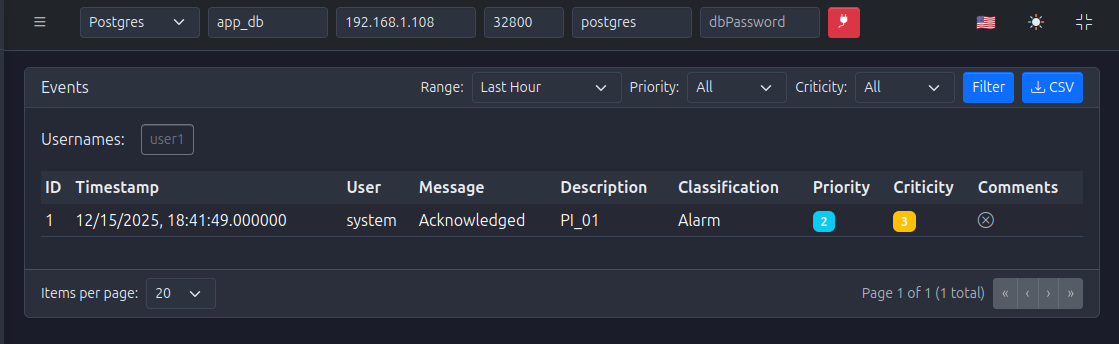
Figure 9: Events module with advanced filtering capabilities - Complete audit trail
📝 Operational Logs Module
Detailed Audit Trail of Operational Activities
The Operational Logs Module provides a detailed audit trail of operational activities, enabling complete traceability and documentation.
✍️ Log Creation
Manual log entry for operational documentation
🔗 Alarm & Event Linking
Associate logs with specific alarms or events
🔍 Advanced Filtering
Filter by user, alarm, date range, and classification
🔎 Comprehensive Search
Search by message or description content
📤 Export Functionality
CSV export for reporting and compliance
🔗 Traceability
Complete chain of documentation for incidents
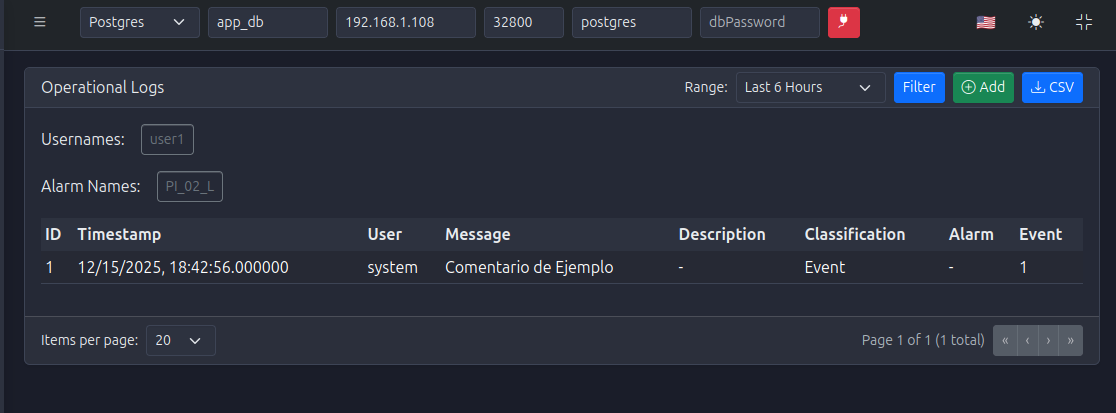
Figure 10: Operational logs interface for documentation and traceability - Complete audit chain
👥 Users Module
Robust User Management with Role-Based Access Control
The Users Module provides robust user management with role-based access control (RBAC) for secure system operation.
🔐 Role-Based Access
Admin, Operator, and Guest roles
🔑 Password Management
Secure password policies and reset capabilities
👤 User Administration
Create, edit, and manage user accounts
🛡️ Security Best Practices
Following industry standards for authentication
📜 Audit Trail
Complete logging of user management activities
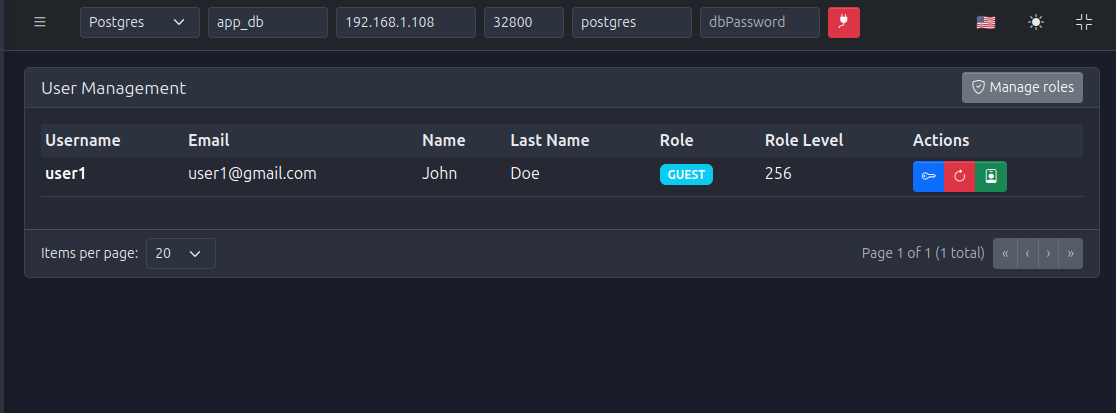
Figure 11: User management interface with role-based access control - Secure and comprehensive
⚙️ Settings Module
Centralized System Configuration Management
The Settings Module centralizes system configuration management, enabling easy backup, migration, and restoration.
💾 Configuration Export
Complete system configuration backup
📥 Configuration Import
Restore or migrate configurations
📋 Logger Configuration
Adjust log levels and rotation settings
⚙️ System Parameters
Centralized system-wide settings
📚 Version Control
Maintain configuration history
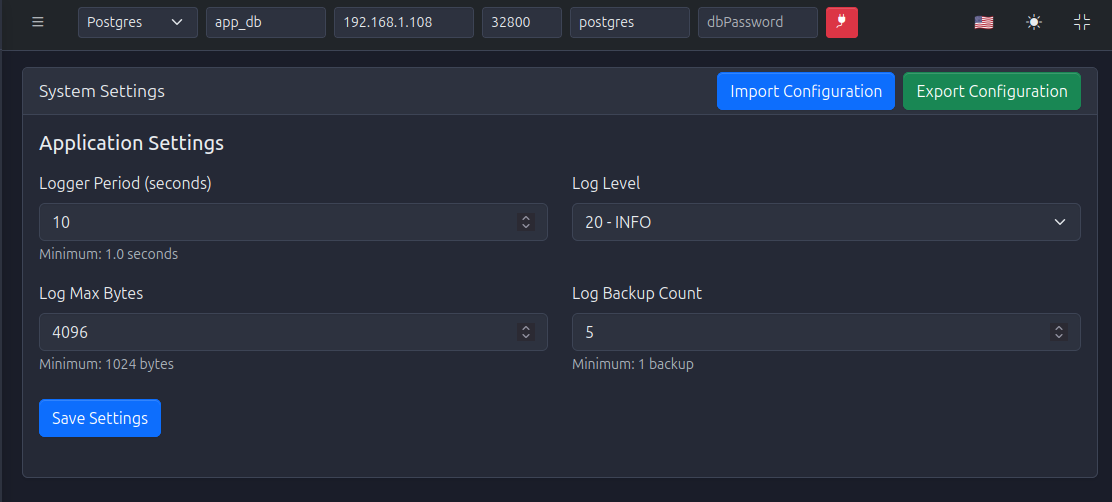
Figure 12: System settings and configuration management - Centralized and powerful
🚀 Getting Started
Ready to Begin Your Journey?
Follow this quick start path to get up and running with PyAutomation in minutes!
📖 Start with Basics
- Review the Quick Start Guide for Docker deployment
- Set up your database connection
- Configure your first OPC UA client
🏷️ Create Tags
- Navigate to the Tags Module
- Create tags from your OPC UA connections
- Configure filters and anomaly detection
🚨 Set Up Alarms
- Visit the Alarms Module
- Define alarm conditions for critical variables
- Configure alarm priorities and classifications
📊 Visualize Data
- Explore Real-Time Trends for live monitoring
- Create custom dashboards with multiple charts
- Configure buffer sizes for optimal performance
🔍 Monitor & Maintain
- Use the Events Module for audit trails
- Create Operational Logs for documentation
- Monitor Machines for system health
🌟 Why Choose PyAutomation 2.0.0?
🎨 Modern Interface
React-based UI provides a smooth, responsive experience
📦 Comprehensive
All-in-one solution for industrial automation
✅ Standards-Compliant
Follows ISA-18.2 for alarm management
🔧 Flexible
Modular architecture allows customization
📈 Scalable
Handles small to enterprise-level deployments
🌍 Open Standards
OPC UA for seamless integration
📚 Well-Documented
Extensive guides and examples
📖 Next Steps
🎓 Dive Deeper into Each Module
Click on the module links above to explore detailed guides. Each module guide includes:
📝 Detailed Explanations
Comprehensive feature documentation
👣 Step-by-Step Procedures
Clear instructions for every task
🖼️ Visual Guides
Screenshots and diagrams for clarity
💡 Best Practices
Industry-proven recommendations
🔧 Troubleshooting
Solutions to common issues
🔗 Integration Examples
Real-world use cases
Welcome to PyAutomation 2.0.0
Where Industrial Automation Meets Modern Web Technology!